
Hotseater, Consultant or Gear Only? How to Scope Trial Technology for Your Next Trial

The short answer: Trial technology support comes in four levels: equipment rental and setup, a trial consultant, a full hotseater, or a consultant who also hotseats the trial. In Regal’s experience, clients choose the combined consultant-plus-hotseater arrangement most often. Exhibit volume, deposition video, multiple displays, demonstratives and high stakes are the factors that push a case toward hands-on support.
A generation ago, “courtroom technology” meant a television on a rolling cart and a tape that might or might not play. Today, a well-run trial can send an exhibit to the judge, the jury and opposing counsel at once, cue a synced deposition clip in seconds, and mark up a document while the witness is still answering.
 Attorneys who have not used trial technology support recently tend to ask the same three things: what the trial tech actually does, whether the case justifies the cost, and how much help they need. The third question matters most, because trial technology support is not a single service. It is a range, and the right level depends on the case.
For lawyers and firms with a strong grasp of legal apps and technology, or with in-house support staff who have it, the right service may be more consultative than actual staffing. In one recent case, we helped prep and load the exhibits onto a server. Once that was done, the client synced their iPads and ran the trial presentation wirelessly during trial, using only those devices and an Apple TV.
What a trial tech does
 A trial technician, often called a trial tech or hotseater, runs the courtroom presentation technology during a trial or evidentiary hearing. From a seat at or near counsel table, the trial tech operates the hardware and software that puts evidence in front of the judge, the jury and opposing counsel.
At minimum, the job is getting the right exhibit on the right screen at the right time. At its fullest, the trial tech is a working member of the trial team who has loaded, indexed and prepared every document, photo, video clip and graphic, and can bring up any of it the moment counsel asks.
Four ways to engage trial technology support
| Service level | During trial preparation | In the courtroom | Best fit |
|---|---|---|---|
| Equipment rental and setup | Supplies screens, switchers, cables and stands; visits the courtroom to confirm everything works | No trial tech present | Attorneys, or a paralegal, comfortable running the presentation themselves |
| Trial consultant | Organizes exhibits, builds the presentation, helps plan the technology approach | No trial tech present | Teams that want professionally prepared exhibits but will present on their own |
| Full hotseater | Prepares for the trial | At counsel table for the entire trial: exhibit callouts, video clips, annotation, all courtroom technology, following counsel’s lead | Complex trials and large exhibit volumes, where the extra horsepower earns its cost |
| Consultant plus hotseater | Organizes, indexes and builds the presentation | Hotseats the trial | Most matters; the trial tech arrives already knowing the case |
In our experience, the combined arrangement is the one clients choose most often. The trial tech who built the exhibit set is the person best placed to run it under pressure.
Signs your case needs more than equipment
It depends on the case, but these factors push toward hands-on support:
- Exhibit volume. Once a case passes roughly 50 to 100 exhibits, managing them by hand during testimony becomes a real burden on counsel.
- Deposition video. If you plan to play video deposition clips, a trial tech is close to essential. Clips must be synced to the transcript, edited and indexed in advance, and running them live without help invites delays.
- Multiple displays. Many courtrooms now have separate witness, juror and counsel-table screens, and someone has to manage what appears on each.
- Demonstratives. Animations, medical illustrations, timelines and other demonstratives land better when someone runs them smoothly.
- Stakes. When the outcome matters most, a technical stumble during closing argument is the last thing you want.
Done well, trial technology disappears. Counsel gives the signal, the evidence is on screen, and the jury never thinks about the person who put it there.
A note on platforms
Most trial techs work in one or more of three presentation platforms. Ask which one your trial tech uses and whether it suits the case.
- TrialDirector. A long-established, PC-based platform and a common choice for complex, multi-day trials with heavy document volume. It is especially strong at syncing and editing deposition video, so a major trial is likely to run on it.
- TrialPad. An iPad app that is portable and easy to learn. Solo practitioners and smaller firms often prefer it for quick exhibit callouts when the exhibit count is manageable.
- OnCue. Trial presentation software built for large trials. It manages exhibits, syncs and edits deposition video, and controls what appears on each courtroom display.
Planning for what can go wrong
 A good trial tech works through three kinds of failure before anyone walks into the courtroom.
What the jury sees. Every exhibit is loaded, indexed and ready for callouts, so the right document appears as soon as counsel names it.
What the room hears and watches. Deposition clips are synced, edited and played through in advance. Audio levels are checked, and backup connections are ready.
What can break. Bring your own internet connection and never depend on the courthouse network. Test in the actual courtroom whenever possible. Keep a wireless display backup, such as an Apple TV, and carry thumb drives with a complete copy of every file.
Test, then test again. In this line of work that is the job description, not a slogan.
The part of the job you don’t see on a spec sheet
In the courtroom, the trial tech is part of your team. That means dressing for the venue, understanding courtroom decorum, communicating clearly with counsel before and during trial, and staying in the background so the jury watches the evidence, not the operator.
When you interview a trial tech, ask what they do when the technology fails in the middle of an examination. How they answer tells you a great deal.
What to have ready before your trial tech’s first call
A trial tech who is taking over your case should ask about each of the items below. If they don’t, treat it as a warning sign. Having the answers ready makes the first planning call productive:
- How many exhibits there are, and what file formats they are in.
- Whether deposition video clips will be played, and whether they are already synced.
- Whether you have all the video files, and whether they are edited and properly formatted.
- Any native files, such as spreadsheets or databases, that must be shown in their original application.
- Photos or unusual video formats that may need to be converted.
- Whether there are joint exhibits, and how they will be handled.
- Whether opposing counsel may want to share the trial tech, with billing split between the parties.
- Whether you need graphics, timelines, or opening and closing slides built.
- How exhibit files will be delivered: cloud storage, thumb drive or a file-sharing service.
- Whether the trial tech can read the trial brief to learn the case before trial.
Remote and hybrid proceedings raise the bar
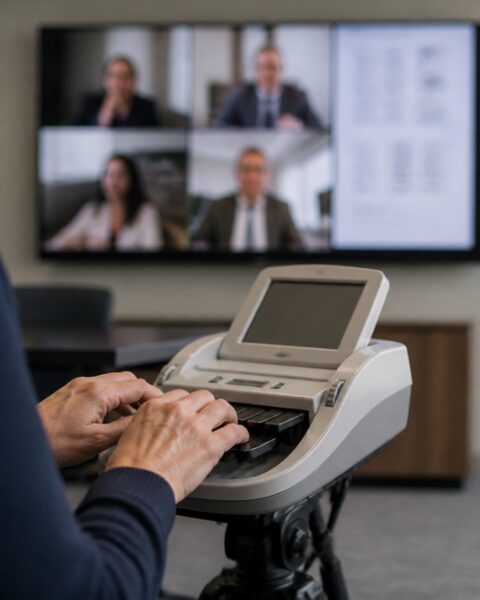 Remote and hybrid proceedings have been normal since 2020, and trial technology has kept pace. A trial tech can manage exhibit sharing through Zoom, Microsoft Teams or legal-specific platforms. More teams now run a “trial-ready deposition,” with exhibits preloaded and presented during a remote deposition just as they would be in court.
If anything, remote work demands more precision. When the technology fails and no one is in the room with the witness, there is no physical fallback.

About the Author: Andy Nation, CLVS, is Director of Legal Technology at Regal Court Reporting, a DepoSpan member firm, where he provides trial technology and legal video services. He has more than two decades of experience in legal technology and litigation support. Learn more at regalcourtreporting.com.
To Learn More or Schedule with DepoSpan
Visit DepoSpan at https://depospan.com/ or call toll-free (844) 400-3376.